

If you're rebuilding your company's website, Webflow and WordPress will almost certainly come up in the conversation. Both are capable platforms. Both power websites for serious service companies. Both are regularly recommended by agencies and developers with strong opinions.
The challenge is that most comparisons are written by people who prefer one over the other. This one isn't. We build on both platforms. Our goal is to help you make the right choice for your company, not to steer you toward a preference.
Here's an honest comparison of Webflow websites and WordPress development for service companies, and a framework for deciding which investment makes sense for your situation.
What Webflow Is
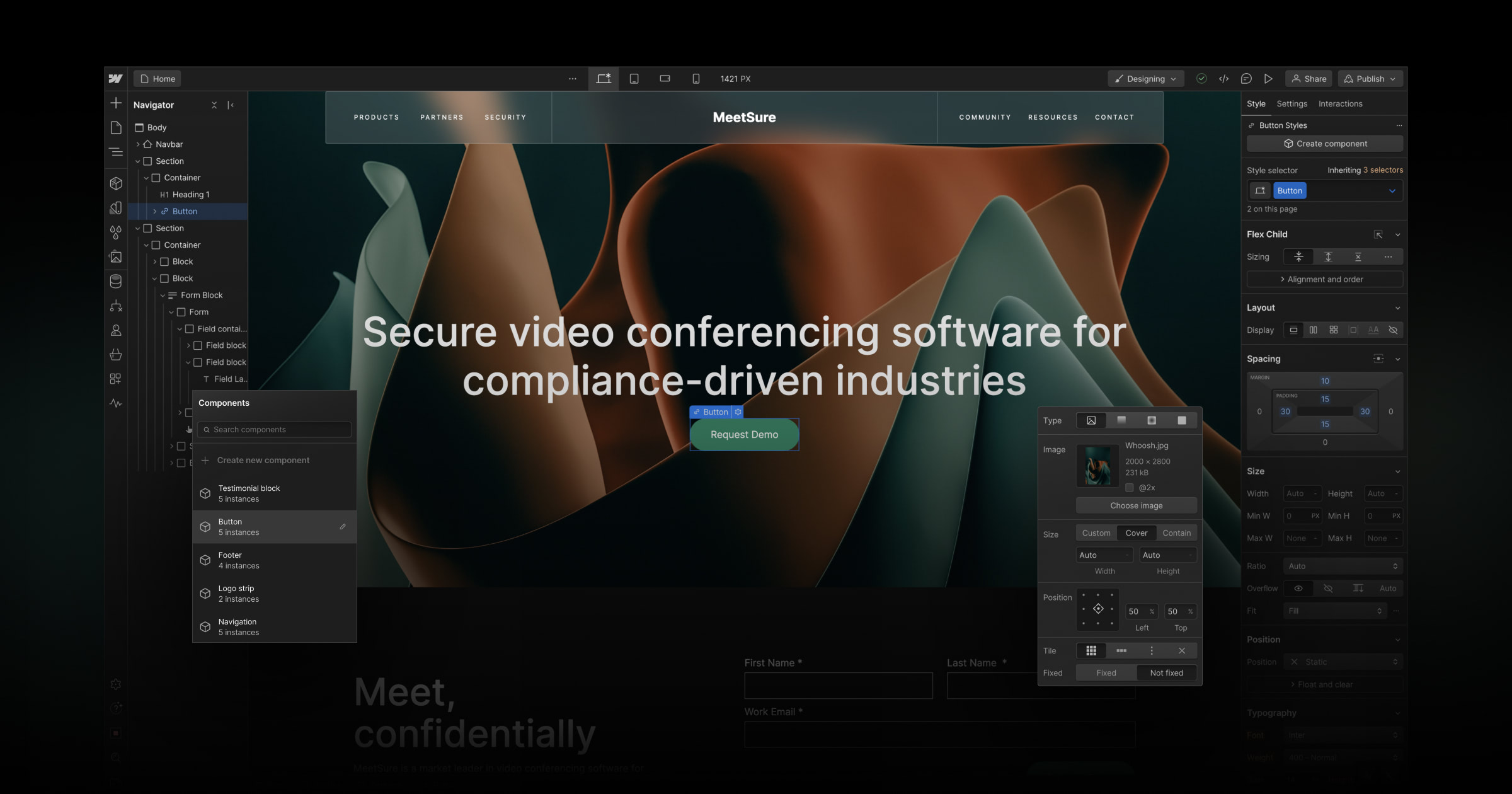
Webflow is a visual design and development platform that lets designers build custom websites without writing traditional code. What gets designed is what gets built, there's no translation layer between the visual design and the live site.
Webflow websites are hosted on Webflow's own infrastructure, which means fast, consistent performance without the need to manage hosting separately. The platform includes a visual CMS that lets non-technical team members update content directly.
Webflow has become a strong choice for service companies that prioritise design quality and want a web design outcome that's genuinely custom without the complexity of a fully bespoke codebase.

What WordPress Development Is
WordPress is an open-source content management system that powers over 40% of websites on the internet. Unlike Webflow, WordPress runs on hosting you manage separately. It's extended through themes and plugins, giving it flexibility that few platforms match.
WordPress development ranges from configuring a premium theme to building a fully custom architecture with bespoke functionality and complex integrations. The platform's longevity means there's an extensive developer ecosystem and a plugin library that covers almost any functionality requirement.
For service companies with complex content needs, deep integration requirements, or large-scale websites, WordPress development remains one of the most capable options available.
Key Differences
Design Control and Quality
Webflow websites offer exceptional design fidelity. Designers work in a visual environment where pixel-level precision is achievable. Animations, scroll-triggered interactions, hover states, and page transitions are built directly into the platform without needing JavaScript libraries or custom code.
WordPress development can achieve the same visual quality, but it typically requires more custom development work to get there. Out-of-the-box WordPress themes have limitations. Reaching a high-design outcome usually means either investing in significant custom front-end development or using a page builder, which introduces its own performance trade-offs.
For service companies where visual distinction is a meaningful competitive factor, Webflow websites tend to deliver a higher design ceiling at a lower development cost.
Content Management
WordPress development has a mature, well-established CMS that most marketing and content teams find intuitive. The admin interface for publishing blog posts, managing service pages, and updating team bios is familiar territory for most users.
Webflow's CMS is visual and straightforward for routine updates, but it has structural limitations for very complex content architectures. If your site requires highly relational content types, multi-author workflows, or advanced editorial controls, WordPress development is typically the stronger option.
For most service company websites, a blog, a team page, service descriptions, case studies, Webflow's CMS handles everything comfortably.
Flexibility and Extensibility
WordPress development's plugin ecosystem is its defining strength. Booking systems, CRM integrations, membership areas, learning management, e-commerce, custom calculators, if you need it, there's almost certainly a mature plugin that handles it, or a developer who has built it before.
Webflow websites have a growing integration ecosystem but are more limited for complex functionality requirements. For service companies that need their website to do something highly specific: a client portal, a custom configurator, a multi-step intake process, WordPress development is typically the better foundation.
Performance
Webflow websites are hosted on a global CDN and generate lean, semantic code. Performance is strong out of the box and Core Web Vitals scores are consistently high without the optimization work that WordPress often requires.
WordPress development can achieve excellent performance, but it requires more intentional effort. Plugin bloat, unoptimized images, and poorly configured hosting are common performance drains. A well-built WordPress site with good hosting and disciplined plugin management performs excellently, it just requires more ongoing attention.
Security
Webflow handles security at the platform level. SSL, DDoS protection, and infrastructure security are managed by Webflow. Your team doesn't need to think about it.
WordPress development requires proactive security management. Its popularity makes it a common target. Regular core updates, plugin updates, security plugins, and monitoring are part of ongoing WordPress site ownership. Managed WordPress hosting reduces this burden, but it doesn't eliminate it.
Team Independence
Both platforms allow non-technical team members to manage content after launch. Webflow's visual editor is arguably more intuitive for non-developers. WordPress's admin dashboard is more familiar to most teams because of how widely it's used.
The difference tends to emerge with design changes. Webflow websites allow visual adjustments to layout and design without developer involvement. WordPress typically requires a developer for anything beyond content, colours, layouts, and structural changes usually mean touching the theme or codebase.
Cost
Webflow websites involve a platform subscription (typically $23–$49 per month depending on the plan) plus the web design engagement cost. There are no hosting costs to manage separately.
WordPress development involves hosting costs (typically $20–$100 per month depending on the host and plan) plus domain registration and any premium plugins or themes. The initial web design investment is comparable to Webflow for a similar scope of work.
The real cost difference tends to emerge over time. WordPress development requires ongoing maintenance investment: updates, security monitoring, occasional developer involvement that Webflow largely handles at the platform level.
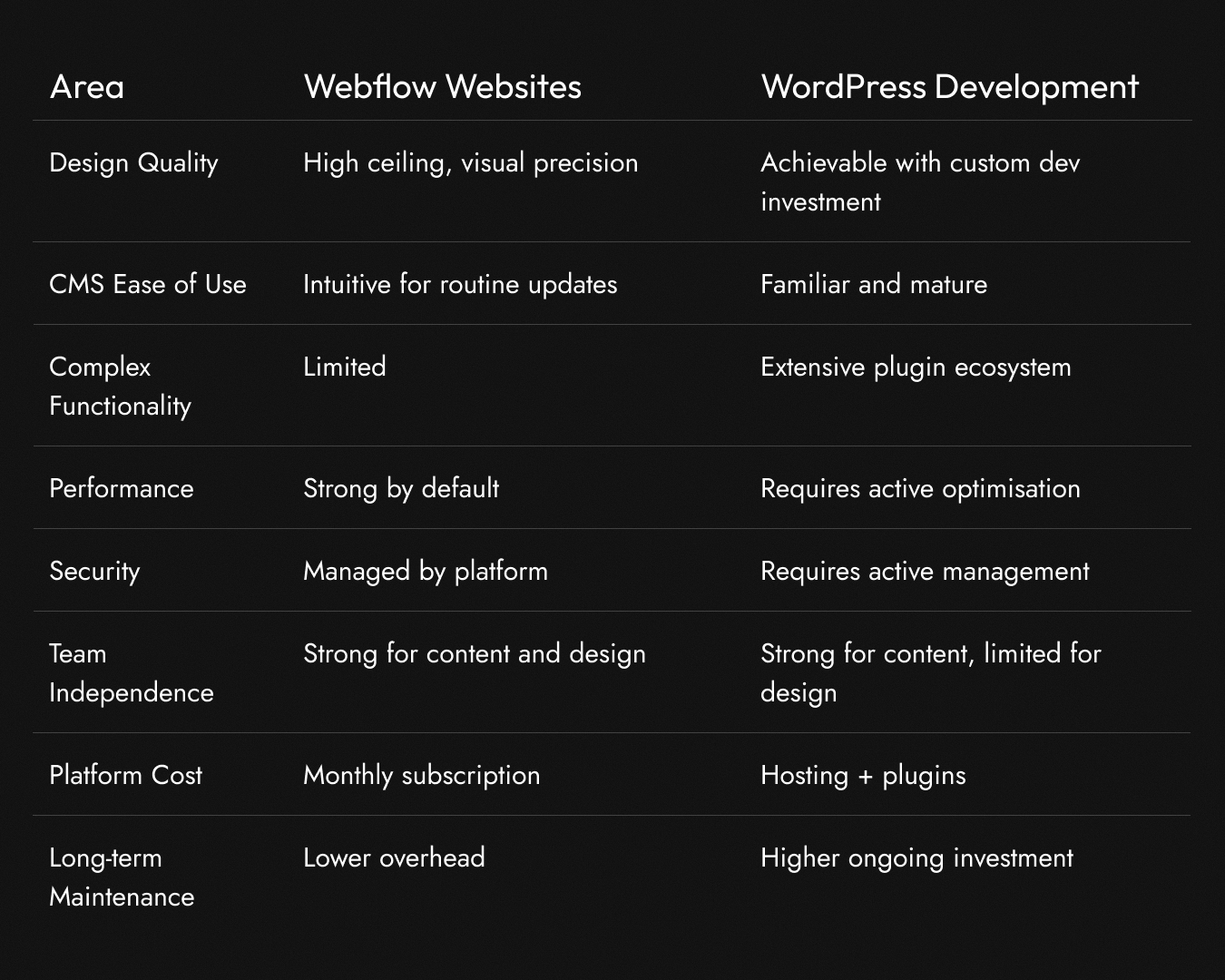
A Side-by-Side Summary
Which Is Right for Your Service Company?
Webflow websites are likely the right investment if:
Your priority is design quality and you want a web design outcome that looks genuinely custom. Your website's primary job is to communicate credibility, showcase your work, and convert visitors into enquiries. Your team wants to manage content independently after launch without relying on developers. You want strong performance without ongoing technical overhead.
WordPress development is likely the right investment if:
Your website requires complex functionality that goes beyond a standard service company site: client portals, custom integrations, advanced content architectures, or membership areas. You have a large content library and sophisticated editorial requirements. Your team is already comfortable in WordPress and switching platforms would create more friction than value. You need deep integration with specific tools that don't have Webflow connectors.
The honest answer:
For most growing service companies rebuilding their website to attract better clients and reflect their current level of expertise, Webflow websites deliver an excellent outcome. The platform is well-suited to the use case: high-quality design, manageable content, strong performance, and lower long-term overhead.
For service companies with genuinely complex requirements, the kind that push beyond what a standard service site needs to do, WordPress development remains the more capable foundation.
The platform matters less than the web design strategy behind it. A well-built Webflow site grounded in strong positioning will outperform a poorly planned WordPress site every time, and vice versa. The right platform in the wrong hands produces mediocre results. The right platform with the right thinking behind it produces a website that actually moves your business forward.
A Note on Switching Platforms
If you're currently on WordPress and considering a move to Webflow, or the other way around, the migration decision shouldn't be driven by platform preference alone. It should be driven by whether the current platform is actively limiting what your website can be.
If your WordPress site is slow, insecure, or difficult to update because of accumulated technical debt, migrating to Webflow during a rebuild is often the cleaner path.
If your Webflow site has grown to a point where you need functionality the platform can't support, moving to WordPress development makes sense.
The best time to evaluate platform fit is at the start of a web design engagement, before anyone has written a line of code.
Making the Decision
If you're unsure which platform is right for your next web design investment, the most useful question to ask is: what does your website actually need to do?
Map out your current site's limitations, your growth plans, and the functionality your next site genuinely needs. Then match the platform to those requirements rather than choosing based on familiarity, trends, or someone else's preference.
If you'd like a platform recommendation specific to your situation, a strategy consultation is the place to start. We'll discuss your requirements honestly and tell you which investment makes more sense for where your company is headed.